How to edit svg icons?
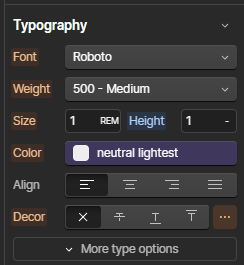
To change the color of SVG icons inside a Code Embed element, adjust the text color in the Typography settings of the parent element.
How do attribute-based (Data) animations work?
This template uses Webflow's native Interactions with GSAP panel to power its motion, no custom code required. Interactions prefixed (Data) in the panel are bound to a custom attribute rather than a single element, so one interaction can animate every element that shares the attribute.
data-gsap-load="fade" plays once, when the page loads. Used on hero sections and above-the-fold content.
data-gsap-scroll="fade" plays once, when the element scrolls into view. Used on sections further down the page.
data-gsap-card="overlay" plays on hover, revealing an overlay on Instructor, Class, and Blog cards. This attribute lives on the card component's root Link element, so editing it there updates every card using that component.
To adjust: open the interaction (labeled with the (Data) prefix, e.g. "(Data) Fade On Load") in the panel and edit duration, delay, or easing, the change applies to every element carrying that attribute. To remove from one element: delete the attribute from that element's Settings panel; other elements sharing it are unaffected. To add to a new element: add the matching data-gsap-* attribute and value, and it will pick up the existing interaction automatically.
How do element-based animations work?
Some interactions in the panel are wired directly to one specific element or class instead of an attribute. These appear without the (Data) prefix and are named after their target. Editing one only affects that instance; it won't propagate to other elements.
To adjust: select the target element on the canvas, then open the Interactions panel, its interaction is listed under "On this page" or "On other pages." Edit the timeline directly.
To remove: delete the interaction from the panel, or remove the class it targets.
To reuse a similar effect elsewhere: duplicate the interaction and reassign its target, since these bindings don't propagate the way (Data) attributes do.
